Flower Motifs: A Practical Guide to Using Hand-Drawn Botanical Dingbats in Modern Design
In the expansive world of digital typography, standard alphanumeric fonts often do the heavy lifting for body text and headlines. However, the emotional resonance of a design frequently hinges on the smaller, decorative details. This is where specialized dingbat fonts enter the conversation. Flower Motifs represents a specific niche within this category, offering a collection of hand-drawn floral and botanical elements rather than traditional letters. For designers, hobbyists, and small business owners creating invitations, greeting cards, or scrapbooking layouts, understanding the utility and limitations of such a resource is essential for making informed creative decisions.
Unlike standard icon libraries or vector packs that require separate software manipulation, a font-based approach integrates these graphical elements directly into your text workflow. This article explores the distinct characteristics of Flower Motifs, compares this approach to alternative design methods, and evaluates when this tool is the most efficient choice for your project.
Understanding the Distinct Nature of Floral Dingbats
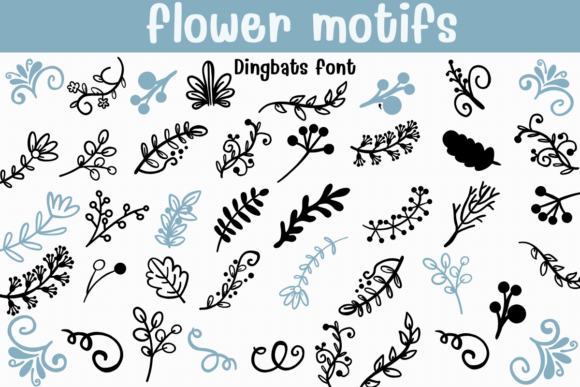
To appreciate the value of Flower Motifs, one must first understand the mechanics of a dingbat font. Traditionally, dingbats were ornamental printers’ characters used to decorate pages. In the digital age, they have evolved into sophisticated sets of icons, symbols, and illustrations mapped to keyboard keys. Flower Motifs is characterized by its charming, hand-drawn aesthetic. The lines are organic, suggesting the imperfection and warmth of human illustration rather than the sterile precision of computer-generated vectors.
The primary distinction here is the workflow integration. When you use a standard image file (such as a PNG or JPEG) of a flower, you must import it, resize it, adjust its position, and potentially edit its color using graphic design software. With a font like Flower Motifs, the floral element behaves like a letter. You type a specific key, and the flower appears. You can change its size, color, and spacing using the same text tools you use for your headings. This seamless integration is the core value proposition for users who prioritize speed and typographic harmony.
Comparing Font-Based Graphics to Vector Libraries and Clip Art
When evaluating resources for adding botanical accents to your designs, you will generally encounter three main options: dedicated dingbat fonts, vector icon libraries (such as SVG packs), and raster clip art. Each has specific tradeoffs regarding flexibility, ease of use, and final output quality.
- Dingbat Fonts (e.g., Flower Motifs): The greatest strength lies in consistency and ease of coloring. Because the elements are treated as text, changing the color of a dozen different flowers requires only a single click if they are selected together. Furthermore, kerning and leading controls allow for precise arrangement along a baseline, which is ideal for creating borders or dividers. The limitation is that complex layering or individual rotation of elements can be more cumbersome than in a vector editor.
- Vector Libraries (SVG/EPS): These offer maximum flexibility. Each petal and leaf can be manipulated independently, allowing for complete customization of shape and form. However, this comes with a steeper learning curve. Users must be proficient in software like Adobe Illustrator or Affinity Designer. For quick projects, the time required to source, import, and adjust individual vectors may outweigh the benefits.
- Raster Clip Art (PNG/JPG): These are the easiest to understand but the least flexible. They often suffer from resolution issues when scaled up and cannot have their colors changed easily without advanced editing skills. They are generally unsuitable for professional print work unless high-resolution files are sourced specifically for that purpose.
For the average user creating wedding invitations or seasonal greeting cards, Flower Motifs strikes a balance between professional appearance and accessibility. It removes the technical barrier of vector manipulation while avoiding the quality pitfalls of raster images.
Ideal Use Cases and Practical Applications
The whimsical, nature-inspired style of Flower Motifs makes it particularly well-suited for projects that require a soft, personal touch. Identifying the right context for its use ensures that the design feels intentional rather than cluttered.
Wedding and Event Invitations
Event stationery often relies on thematic consistency. Flower Motifs allows designers to create cohesive floral borders or corner accents that match the tone of the script font used for the couple's names. Because the elements are scalable vectors, they remain crisp whether printed on a small RSVP card or a large banquet menu. The hand-drawn quality complements the romantic and organic trends currently popular in wedding design.
Scrapbooking and Digital Journals
For digital scrapbookers, the ability to quickly insert decorative elements without leaving their page layout software is a significant advantage. Users can type out dates or captions and intersperse them with small botanical icons from the font to create visual interest. This method is faster than dragging and dropping individual image files, allowing for a more fluid creative process.
Greeting Cards and Social Media Graphics
Small business owners who create their own marketing materials can use Flower Motifs to brand their social media posts. A simple quote overlaid on a plain background can be elevated with a subtle floral divider generated by the font. This maintains a consistent brand aesthetic without requiring a graphic designer for every post.
Evaluating Limitations and Decision Factors
While Flower Motifs is a powerful tool for specific tasks, it is not a universal solution for all botanical design needs. Recognizing its limitations is crucial for avoiding frustration during the design process.
Complexity of Composition: If your design requires a complex, multi-layered floral arrangement where leaves overlap flowers in specific, non-uniform ways, a dingbat font may feel restrictive. Fonts operate on a linear baseline. While you can use open-type features or manual positioning to move elements around, creating a dense, naturalistic bouquet is often easier done with individual vector assets that can be freely rotated and layered in any direction.
Style Consistency: The hand-drawn style of Flower Motifs is charming, but it is also distinct. It may not pair well with ultra-modern, minimalist, or corporate geometric fonts. Designers must ensure that the whimsical nature of the dingbats aligns with the overall mood of the project. Using these motifs in a formal legal document or a high-tech product brochure would likely create a disjointed visual experience.
Learning Curve for Mapping: Unlike standard fonts, you cannot guess which key produces which flower. Users must refer to a character map or a cheat sheet provided with the font. While this is a minor inconvenience, it does add a step to the workflow until the key mappings become memorized. For users who need to produce work under extreme time pressure, this initial lookup time should be factored in.
Making the Right Choice for Your Project
Deciding whether to incorporate Flower Motifs into your toolkit depends on your specific workflow, skill level, and design goals. Here is a practical framework for evaluation:
- Assess Your Software Proficiency: If you are comfortable in word processors, basic page layout tools, or even email clients that support rich text, a font-based solution is highly accessible. If you are an advanced user of vector illustration software, you might prefer the granular control of SVG packs, though you may still find fonts useful for rapid prototyping.
- Define the Scale of Decoration: For repetitive elements, borders, and simple accents, Flower Motifs is efficient. For singular, complex centerpiece illustrations, consider commissioning custom art or using detailed vector bundles.
- Consider the Output Medium: Since fonts are vector-based, they are ideal for print. If your primary output is low-resolution web graphics where file size is a critical concern, ensure that your design software exports the text as shapes or high-quality images to preserve the delicate lines of the hand-drawn elements.
Ultimately, Flower Motifs serves as a bridge between textual content and visual decoration. It empowers users who may not consider themselves illustrators to add professional-grade botanical accents to their work. By understanding its strengths in workflow efficiency and typographic integration, and acknowledging its limitations in complex composition, designers can make informed decisions that enhance their creative output without unnecessary complexity.
Whether you are designing a heartfelt wedding invitation or a seasonal newsletter, the right decorative elements can transform a standard layout into a memorable piece. Flower Motifs offers a reliable, charming, and practical option for those seeking to infuse their designs with the quiet beauty of nature, streamlined for the modern digital workflow.